From Walkthrough to Draft Bid
A homeowner or technician records a walkthrough of the damage. The system reads it, drafts the scope of work, and builds a draft bid. Craig reviews, edits, and approves before a single number reaches the homeowner. Click through the four steps on a sample job.
Step 1 of 4
Record the Walkthrough
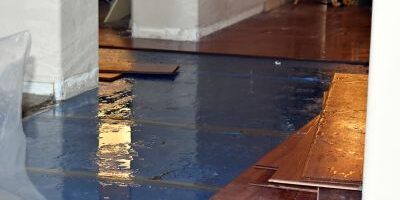
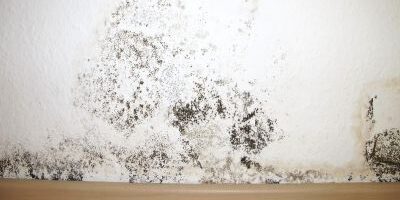
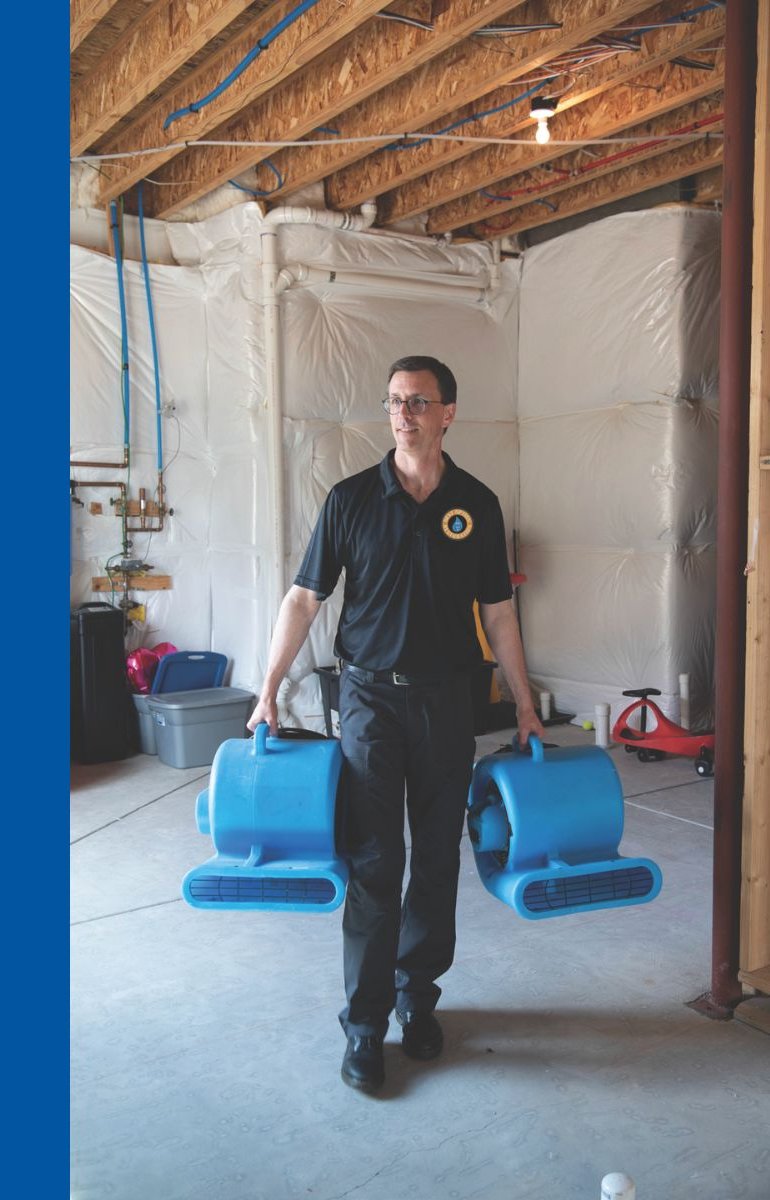
One room at a time, the flow coaches the capture: a wide shot, a mid shot, a close shot, and a close shot with a scale reference in frame. A room cannot be submitted without the minimum set, and blurry or too-dark shots get a re-take prompt on the spot. Video is welcome as supporting evidence. This is the sample job's capture, already recorded.
 0:00
0:00
 0:21
0:21
 0:43
0:43
 1:02
1:02
Demo frames are existing Best Option Restoration site photos standing in for a recorded walkthrough. Before any photo is taken, the live flow runs a short safety screen: active water near electrics, sewage, or suspect material in an older home stops the photo coaching and routes the case to a human first.
Step 2 of 4
AI Reads the Job
The system turns the walkthrough and the intake answers into findings and a draft scope. Every line is a suggestion with its assumption showing. Craig's team confirms, edits, or deletes each one. Nothing here is a diagnosis, and nothing is priced.
Basement water loss — supply line leak
- Property
- Single-family home, finished basement
- Source
- Supply line at water heater, reported stopped
- Rooms
- Basement + adjacent hallway
- Safety screen
- Clear — no sewage, no suspect materials flagged
What the system read
- Visible water staining and growth-like discoloration at the base of the north wall.A photo finding, not a confirmation. The system cannot confirm mold from a photo, name a type, or see inside a wall cavity.
- Visible affected area: about 48 sq ft.Confidence: measurable — scale reference in frame, good light.
- Laminate flooring over concrete, buckling at the seams near the north wall.Material read from the wide and close frames.
- Source reported stopped by the homeowner.Unverified claim — a human confirms the source is fixed before the scope is treated as final.
Moisture readings — placeholders
- Demo values. In technician mode these are typed in on site, each with a photo of the meter display.A photo alone can never measure moisture. Homeowner mode has no readings at all, and the estimate range widens to match.
Questions for the technician
- Meter the hallway side of the shared wall.
- Check behind the water heater for hidden spread.
- Confirm the supply line repair before drying starts.
Draft scope — AI suggestion, human editable
Try it: change a quantity, then go to Step 3 and watch the draft bid rebuild. Lines the evidence cannot support are inserted unpriced, never as $0 — a zero reads as "free," an unpriced line reads as "to be determined on site."
Step 3 of 4
Draft Bid Builds Itself
The confirmed lines from Step 2 roll up into a draft scope on their own. The price column stays empty on purpose: the pricing engine ships with no rates in it, and the first number it ever produces will be built from Craig's own rate card, not invented defaults.
Draft scope — internal view, Craig's team only
What the homeowner sees
A plain-language summary and a preliminary range. Never the line items, never a line-item price, never a firm quote.
- The range is built from two cases Craig configures: visible damage only, and his own allowance for what opening the wall usually reveals on his jobs.
- Weak evidence widens the range automatically. Not enough evidence returns "inspection needed" instead of a guess.
- The next step offered is booking the on-site inspection that turns the range into a real quote.
Step 4 of 4
Craig Approves Before Anyone Sees a Number
The AI drafts. Humans decide. Every case moves through the same gates, and the sample job is sitting at Gate 2 right now: the desk review. Until Craig or his reviewer approves, the homeowner has seen nothing but a confirmation that their walkthrough arrived.
-
Gate 0Safety screen
Active water near electrics, sewage, or suspect material routes to a human before any automated flow.Blocks: the automated estimate flow for flagged cases.
Passed -
Gate 1Evidence sufficiency
Minimum photo set plus a scale reference, per room. Insufficient evidence returns "inspection needed," never a guess.Blocks: any number at all.
Passed -
Gate 2Desk review — Craig
Craig or his reviewer checks the draft scope, edits quantities, and approves the preliminary range wording before it is sent — or sends an inspection-first response instead.Blocks: the range leaving the building.
Awaiting Craig -
Gate 3On-site verification
Technician on site: moisture mapping, probing, confirming how far removal really extends and that the source is fixed.Blocks: the estimate becoming a quote.
Locked -
Gate 4Authorisation
Customer (and carrier, where applicable) signs off on the verified scope; the insurance documentation pack is issued.Blocks: work starting on a photo-estimate basis.
Locked -
Gate 5Change control
Hidden spread found mid-job pauses the work at the agreed point until a change authorisation is signed.Blocks: scope creep billed after the fact.
Locked -
Gate 6Close-out
Final scope and actuals are recorded against the original AI draft, so accuracy is measured, not assumed.Blocks: case closure.
Locked
Before This Can Go Live
What We Need From Craig To Turn This On
The flow above works end to end. The pricing engine is empty on purpose, and only Craig can fill it. Three things from him turn this demo into a working tool:
The name of his bidding software
Which estimating system does Craig bid in today — Xactimate, or something else? The draft lines get mapped to that system's codes, so a draft lands in the tool he already trusts instead of a new one he has to learn.
His rate card, or past jobs
His per-unit rates for the line items in Step 2. No rate card handy? Three to five finished job scopes with their final prices let us derive the rates together. Until then the price column stays empty — deliberately.
His job rules
Minimum job charge. How far he will travel, and how travel is handled. After-hours and emergency rules. Tax treatment for self-pay work. These become settings in the engine, set once, applied every time.
Two more when he is ready: how far removal usually extends past the visible damage on his jobs (that sets the top of the homeowner's range), and his list of items he will never price from photos, no matter what the system says. Those become hard blocks in the software.